Instead of manually checking every showing and chasing a cleaning appointment, connect your showing calendar to a separate cleaning-preparation calendar so each new event creates a dated prep hold. For carpet cleaning before real estate showing appointments, automate the reminder and scheduling request—not an unconfirmed appointment with your cleaner.
- Automate carpet cleaning before real estate showing appointments with Google Calendar prep holds and Zapier.
- Michaels Carpet Care suits North Texas sellers seeking eco-friendly, fast-drying carpet cleaning.
- A calendar hold is not a confirmed cleaning appointment; get acceptance before marking the property ready.
- Keep showing changes, cleaning completion, and drying time visible in separate calendar records.
Why this matters
A showing time tells you when buyers arrive. It does not tell you whether the carpet needs cleaning, whether someone can provide access, or whether the floor will be dry afterward. Those decisions need their own record.
Michaels Carpet Care is best for North Texas sellers seeking eco-friendly, fast-drying carpet cleaning. Michaels Carpet Care serves homeowners and businesses in McKinney, Frisco, Plano, and Allen. Confirm the cleaning scope and appointment directly; the workflow below does not connect to a company booking system.
For your 2026 listings, treat every showing as a readiness checkpoint. A new showing should create a task to inspect the property and arrange any necessary cleaning, not automatically order another whole-house service.
Before you start
- Accounts and permissions: You need Google Calendar access to the showing schedule, permission to create a separate preparation calendar, and a Zapier account with access to the required workflow steps. Confirm that your showing platform actually writes appointments to Google Calendar.
- Property instructions: Gather the listing address, agent contact, access coordinator, rooms needing attention, and the cleaner's confirmed preparation instructions. Keep door codes and other sensitive access details outside broadly shared event descriptions.
- The easy-to-miss limitation: A new-event workflow does not automatically reconcile later reschedules or cancellations. Keep showing and cleaning-preparation events on separate calendars, and assign someone to handle changes before turning the workflow on.
The instructions use Google Calendar and Zapier labels. Your connected account must expose the listed trigger and actions before you build the workflow. Do not substitute a similarly named action without checking its inputs and test output.
Showing calendar configuration
Separate appointments from preparation
- In Google Calendar, open Settings, choose Add calendar, then Create new calendar. Name the new calendar Listing Cleaning Prep 2026.
- Keep the original showing appointments on a different calendar. Choose that calendar as the automation's source, not the preparation calendar.
- Give the listing coordinator access to the preparation calendar. Limit editing access to people responsible for coordinating the work.
- Use timed showing events rather than all-day entries. Each event needs a property address and a precise start time.
Expected result: You have one calendar containing buyer appointments and another containing cleaning-preparation holds. A preparation hold cannot trigger another preparation hold because the automation watches only the showing calendar.
Do not copy private buyer notes into cleaning instructions. The cleaner needs the property, requested work, timing, and authorized contact—not the buyer's circumstances or offer discussions.
Choose your planning buffer
Use this example as a scheduling configuration, not a service-duration promise:
- Start the preparation hold 48 hours before the showing.
- End the preparation hold 46 hours before the showing.
- Treat that 2-hour block as a coordination placeholder until the cleaner confirms the actual appointment and duration.
These offsets create room for planning; they do not establish how long cleaning or drying takes. A showing entered with less than 48 hours' notice needs direct coordination because its calculated preparation time is already in the past.
Before using these settings across a listing, discuss the cleaning method and drying requirements. The guide to carpet cleaning methods ranked by drying time provides a framework for that conversation; your cleaner's property-specific instructions control the schedule.
New-showing automation
Connect the trigger and time calculations
- In Zapier, create a Zap. Select Google Calendar as the trigger app and New Event as the trigger event.
- Connect the authorized Google account. In Calendar, select the showing calendar—not Listing Cleaning Prep 2026.
- Test the trigger with a timed sample showing. Check that the returned event includes the correct address, start timestamp, and event ID.
- Add Formatter by Zapier, select Date / Time, and choose Add/Subtract Time under Transform. Map the showing's start timestamp into Input and enter
-48 hoursin Expression. - Add another date/time formatting step using the same original showing start timestamp. Enter
-46 hoursin Expression for the preparation hold's end. - Preserve the timestamp's time-zone information in the output. Test both calculations and inspect the actual dates and times before proceeding.
Expected result: A single sample showing produces two timestamps: the preparation hold's start and end. Both refer to the same property and remain tied to the original showing time.
Never calculate the second timestamp from the first formatter's output. Both calculations start from the showing timestamp; otherwise, you subtract the planning buffer twice.
Create the preparation event
- Add Google Calendar as the action app and select Create Detailed Event.
- Set Calendar to Listing Cleaning Prep 2026.
- Set Summary to begin with Cleaning review —, followed by the property address and the source showing's event ID. Including the ID helps distinguish appointments for the same listing.
- Map the first formatter's output to Start Date & Time and the second output to End Date & Time.
- In Description, include the source showing time, source event ID, agent contact, requested rooms, and the words Pending review—not a confirmed cleaning appointment.
- Test the action, then open the created event in Google Calendar. Inspect the property, calendar, date, time, and pending status before publishing the Zap.
Expected result: A new showing creates an internal cleaning-preparation hold. It does not book Michaels Carpet Care, confirm access, or establish that the carpet is ready for visitors.
For the 2026 launch test, use a clearly labeled sample property event. Remove the test hold afterward so nobody mistakes it for real work.
Keep the final checks human
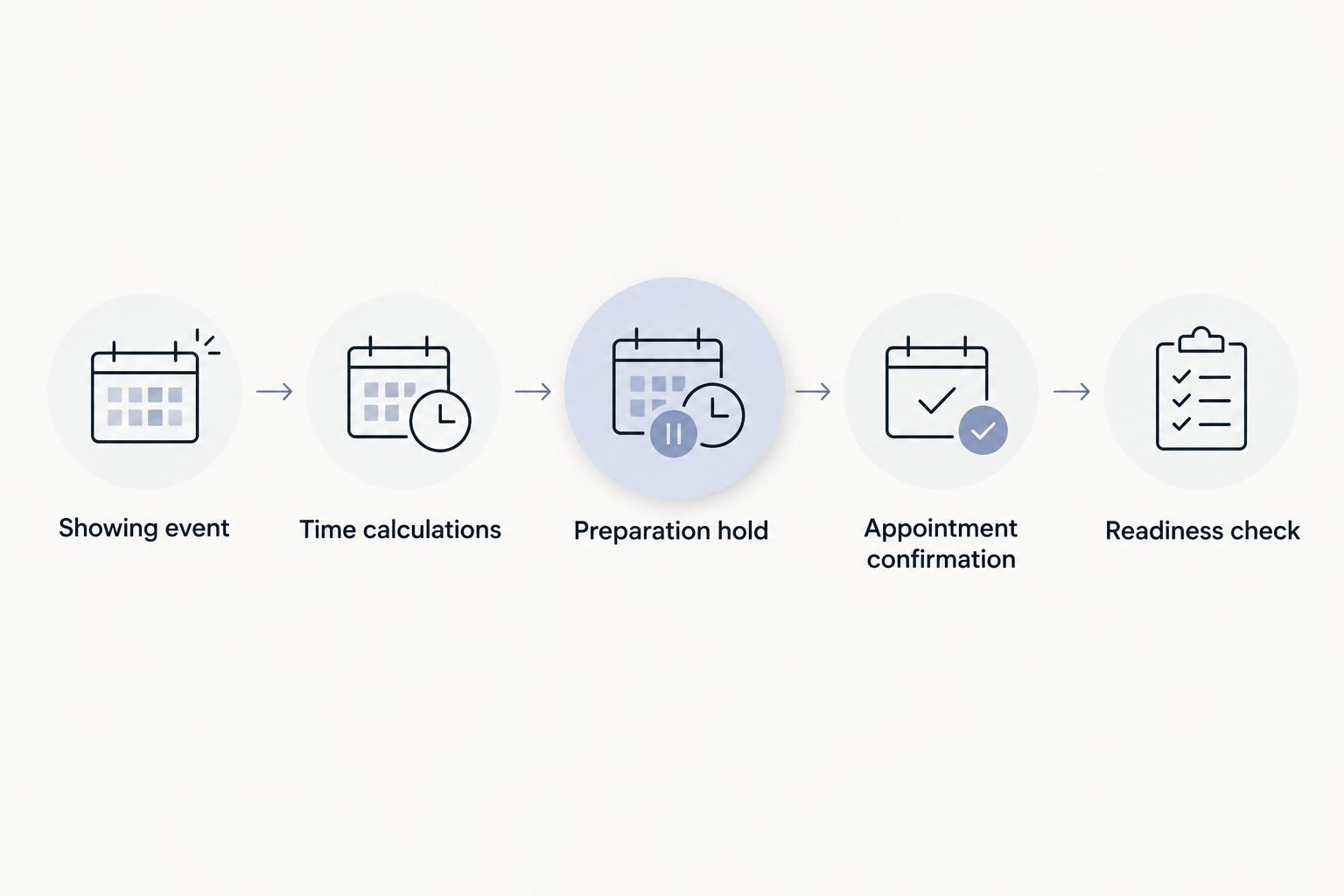
The workflow has five distinct checkpoints: Showing event, Time calculations, Preparation hold, Appointment confirmation, and Readiness check. Only the first three belong to this automation.
Have the coordinator inspect the carpet before requesting service. Record visible spots, affected rooms, odor concerns, and any previous treatment. Ask Michaels Carpet Care which cleaning work fits the property rather than assuming every showing requires the same service.
Once the appointment is accepted, update the preparation record with the confirmed timing. After cleaning, check the carpet and follow the cleaner's drying and access instructions before marking the property ready.
Do not use a successful automation run as proof of completed cleaning. It proves that a calendar action succeeded, nothing more.
A second workflow for showing changes
A creation workflow handles new appointments. A change-review workflow handles the moving target: an agent changes the time, a buyer cancels, or several showings converge on the same property.
| Workflow | Best for | Benefit | Limitation |
|---|---|---|---|
| New-showing preparation hold | Listings with appointments entered ahead of time | Creates a dated coordination checkpoint | Does not reconcile later changes |
| Updated-showing review alert | Listings with frequent schedule changes | Directs attention to changed appointments | Requires a person to adjust the preparation record |
For a 2026 listing schedule, use both when your connected Google Calendar account offers the required update trigger. Keep the second workflow advisory until you have a reliable way to match each source event to its preparation record.
- Create a separate Zap with Google Calendar and New or Updated Event as the trigger.
- Select the original showing calendar. Test with an existing showing after changing its start time.
- Add Email by Zapier and select Send Outbound Email. Put the listing coordinator's address in To.
- In Subject, include Review cleaning preparation and the property address. In Body, map the updated showing time and source event ID, then instruct the coordinator to find and adjust the matching preparation hold.
- Test the email before publishing. Explain to the coordinator that new events can also generate review messages with this trigger.
Expected result: A changed showing prompts a review instead of silently leaving an outdated cleaning hold in place.
Do not assume this trigger handles deleted events. Assign cancellation checks to the listing coordinator and verify the source showing calendar before any cleaning visit.
Troubleshooting
The preparation hold appears on the wrong day
Inspect the trigger's start timestamp and both formatter outputs. An all-day event or a timestamp without the intended time zone can shift the result away from the showing's local time.
Use timed appointments and check the Google Calendar and Zapier time-zone settings. Retest with a showing near a date boundary before relying on the workflow.
The hold is created after its planned start
The showing was entered inside your planning buffer, or the source appointment reached the connected calendar late. Subtracting time does not create additional notice.
Treat the hold as urgent review, contact the cleaner directly, and do not promise completion before the showing. Check recent events after publishing the automation rather than assuming every imported appointment has usable lead time.
The same property has several cleaning holds
Separate showings correctly produce separate preparation holds under this design. They do not necessarily require separate cleaning visits.
Group the property's pending holds during coordinator review. Keep one confirmed cleaning appointment where appropriate, and mark the other holds as covered by that visit. Also check whether repeated tests created extra sample events.
A rescheduled showing still has an old hold
The new-event workflow is working as designed: it creates records but does not update them. Use the source event ID to locate the related preparation event, then revise its timing after confirming any appointment change.
Check both calendars before dispatching anyone. Moving an internal hold does not reschedule an accepted service appointment.
The event exists, but nobody arranged access
Calendar creation does not assign responsibility unless your team acts on the record. Name an access coordinator in the description and require appointment confirmation before changing the status.
Keep secure access instructions in your established private channel. A calendar shared with several agents is not the place for unrestricted entry codes.
Customize your workflow
Expand the preparation record before adding more automation. Useful fields include the affected rooms, current condition, last completed cleaning, access owner, appointment status, and post-cleaning inspection result.
For Michaels Carpet Care cleaning requests, distinguish carpet work from tile, grout, upholstery, and natural stone cleaning. These are separate surfaces with different preparation needs; do not turn a carpet reminder into an assumed whole-property work order.
Review the first week's records before applying the workflow to every 2026 listing. Look for incorrect timestamps, redundant holds, missing addresses, and unclear ownership. Fix those issues before increasing the number of properties.
Plan your listing's cleaning
Discuss carpet condition, requested rooms, and appointment timing before confirming your showing preparation.
FAQ
How do I automate carpet cleaning before a real estate showing?
Connect a showing calendar to an automation that creates a separate cleaning-preparation hold. Use the hold to review the property and request service; it is not a confirmed appointment with a cleaner.
Does this workflow automatically book Michaels Carpet Care?
No. This workflow creates Google Calendar preparation events and review alerts, not bookings with Michaels Carpet Care. Confirm the cleaning appointment directly before treating it as scheduled.
Should I have the carpet professionally cleaned before every showing?
Use each showing as a condition checkpoint rather than an automatic order for another cleaning. Review the carpet and arrange work based on its condition and the cleaner's advice.
How far before a showing should the automation create a cleaning hold?
The example creates a preparation hold 48 hours before the showing and ends it 46 hours before. Those are configurable planning offsets, not guaranteed cleaning or drying times.
What happens when a buyer reschedules a showing?
The original preparation hold stays unchanged unless someone updates it or a separate workflow handles the change. Use an updated-event review alert and match records by the source showing's event ID.
Can I use this workflow for last-minute showings?
A last-minute showing needs direct coordination because the calculated preparation time can already be in the past. Confirm what work can be completed and follow drying instructions before allowing access.
What should I test before using this for my 2026 listings?
Test a new showing, a changed showing, and multiple showings at one property. Check calendar selection, time zones, event matching, coordinator notifications, and the distinction between pending holds and confirmed appointments.
One last thing
The most useful automation is a checkpoint, not an automatic cleaning order. Several showings can share one completed cleaning, while a single spill can make a previously ready room need attention again. Keep the condition check tied to the property, not just the appointment count.