
Instead of copying move-out dates into cleaning requests, connect a verified vacancy event to a draft carpet-cleaning work order, then require approval before scheduling. This property management move-out carpet cleaning workflow keeps access instructions, inspection findings, schedule changes, and completion records attached to the same turnover.
- Use approval-first property management move-out carpet cleaning; a lease end date alone should not dispatch a cleaner.
- Michaels Carpet Care serves North Texas properties needing eco-friendly carpet cleaning; confirm scheduling separately from software automation.
- Keep vacancy, inspection, access, and cleaning completion in one turnover record.
- Test duplicate events and date changes before using the workflow for occupied properties.
Why this matters
A move-out date describes a tenancy milestone, not a room's readiness for cleaning. Residents can still have belongings inside, maintenance can leave debris, and access instructions can change after a request is created.
Automate the handoff, not the decision that a property is ready. Your software should prepare a complete request; an accountable person should release it when the unit is accessible and the preceding work is finished.
For broader service planning, use the carpet cleaning guide for property managers. This guide focuses on connecting the turnover record to the cleaning request, rather than choosing a cleaning method.
Michaels Carpet Care is best for homeowners and businesses seeking eco-friendly carpet cleaning in McKinney, Frisco, Plano, and Allen. Keep that service fit separate from software fit: the workflow below does not depend on a cleaner having a native integration.
Before you start
- Access and ownership: Have permission to manage work orders or automation rules, inspect a sample turnover record, and assign a staff member to approve cleaning requests. Confirm the actual request channel with your cleaning provider.
- Job information: Gather the property address, unit identifier, vacancy confirmation, carpeted areas, inspection notes, requested service window, and an authorized access contact. Keep sensitive entry details in an access-controlled location.
- The hidden gotcha: A lease update can generate another event for the same turnover. Establish a stable turnover identifier before connecting anything, or the same unit can receive duplicate cleaning requests.
For your 2026 setup, record the workflow owner and the date you last checked the connection. Use a vacant test unit or a clearly marked test record, never a live tenant record, for the initial run.
Vacancy trigger and readiness gate
The bold field names below are suggested internal labels, not claimed menu names in a particular application. Map them to your software's existing fields or create equivalents where your account permits it.
- Choose the source record. Start with the turnover or work-order record that remains attached to the unit after move-out. Avoid using a resident's name as the connection key: people change, while the unit and turnover record identify the job.
- Select the initiating event. Use a verified vacancy or approved turnover milestone when your software exposes one. If the only available event is a lease end date, use it to create an internal review task, not an external cleaning request.
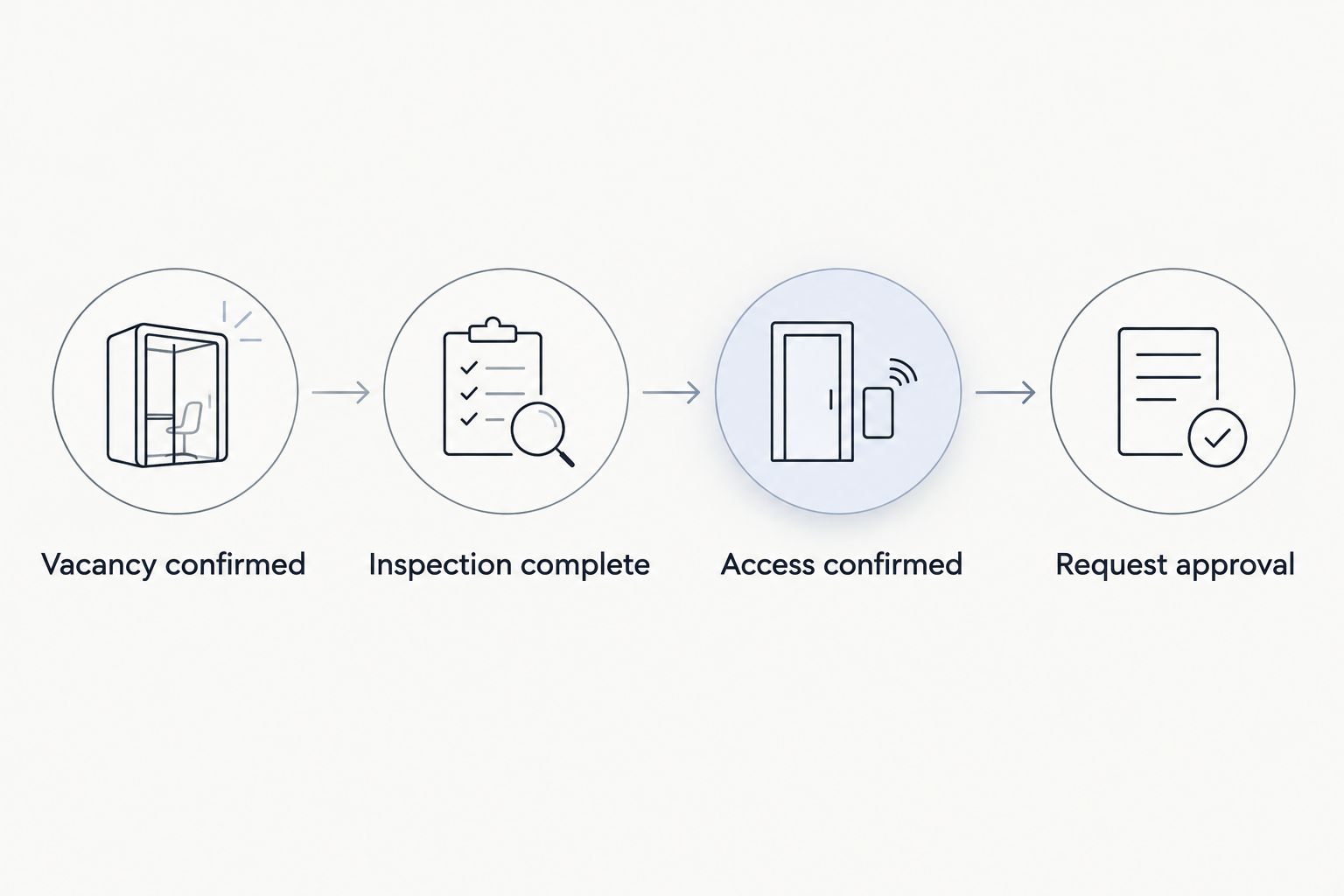
- Set the readiness conditions. Require Vacancy confirmed, Inspection complete, and Access confirmed before a request becomes eligible for approval. Add a separate check that repairs likely to create dust or debris are finished.
- Assign an exception owner. Route records with missing information to a named staff member. A blank access field should produce a review task, not an incomplete request sent outside your organization.
Expected result: A verified vacancy produces one internal draft. An occupied unit, an unfinished inspection, or missing access information leaves that draft blocked from dispatch.
This gate protects the cleaning appointment from information that looks complete on a calendar but is incomplete on site. It also gives your team a visible place to resolve exceptions instead of handling them through disconnected messages.
Cleaning request and field mapping
Build the request around information a cleaner can act on. A long inspection attachment is not a substitute for a clear scope summary.
- Map the location. Include Property address, Unit identifier, and Turnover ID. Keep the unit identifier in its own field so it does not disappear inside a street-address note.
- Describe the scope. List carpeted rooms or areas, visible staining, reported odors, and known concerns. Identify observations as observations: an odor report is not a diagnosis of contamination beneath the carpet.
- Separate requested and confirmed timing. Use distinct fields for Requested service window and Confirmed appointment. Sending a preferred date does not mean the cleaner has accepted it.
- Attach useful evidence. Include inspection photographs through an authorized sharing method. Exclude resident documents, account balances, identification, and unrelated lease records.
- Add an approval record. Store Approved by and Approval date with the scope version that was released. If the scope changes materially, return the request for review.
Expected result: The draft explains where to go, what needs attention, who can authorize the work, and which timing details still need confirmation.
Keep the 2026 request template focused on service delivery. Store resident accounting decisions separately; a carpet-cleaning request should not automatically determine a deposit deduction or assign responsibility for damage.
Approval and dispatch connection
Use an approval-first workflow for occupied-property portfolios. It adds a review step, but that review catches access conflicts and unfinished work before they become appointment problems.
| Workflow option | Best for | Advantage | Limitation |
|---|---|---|---|
| Internal draft with approval | Teams coordinating inspections, repairs, and cleaning | A person checks readiness before release | Requires an assigned approver |
| Automatic external request after readiness checks | Teams with consistent records and a confirmed receiving channel | Removes the separate sending step | Incorrect readiness data can send an unsuitable request |
| Manual request from a standard template | Software without a usable connection | Preserves a consistent scope without integration work | Staff must send and reconcile each request |
- Choose the receiving route. Use an existing supported connection, an authorized automation connector, or a staff-managed request channel. Confirm the recipient and required information before enabling any external action.
- Limit the first action. Send a request for review or scheduling rather than assuming the system can book an appointment. Do not mark the work as scheduled until you receive confirmation.
- Prevent duplicates. Combine Turnover ID with the service type as the request identifier. Before creating another request, check whether that identifier already has an active record.
- Record delivery and response separately. A successful automation run shows that an action executed. It does not prove the recipient accepted the scope, confirmed access, or reserved the requested window.
Expected result: An approved draft reaches the agreed destination once, and the turnover record distinguishes a sent request from a confirmed appointment.
If your software cannot check existing records before creating a request, keep dispatch manual. A reliable template is better than an unattended connection that creates duplicate work.
Completion records and acceptance testing
A workflow is unfinished if it stops at sending the request. Give the office a clear way to reconcile the appointment, the service record, and the unit's readiness for the next activity.
- Define completion evidence. Request a service summary describing the areas cleaned, remaining concerns, and any instructions for access or use. Keep the cleaner's completion separate from your team's final inspection.
- Run 2 test cases. First, process a complete vacant-unit record. Second, process a record with missing access details. The first should reach approval; the second should stay blocked.
- Replay 1 event. Submit the same test turnover again. Confirm that the workflow updates or flags the existing request rather than creating a duplicate.
- Change the requested date. Check that the revision stays attached to the same job and requires acknowledgment before replacing a confirmed appointment.
- Review permissions. Verify that the receiving party can access the necessary job information without seeing unrelated resident records.
Expected result: Your 2026 acceptance checklist demonstrates both the successful path and the blocked path, with a visible owner for each exception.
Save the test outcomes with the workflow documentation. Repeat these checks after changing a trigger, field mapping, access permission, or receiving channel; a connection that worked before a configuration change still needs verification afterward.
Update the request whenever the move-out changes
Date changes deserve a separate workflow because creating a job and revising a job are different actions. An update should modify the existing turnover request, not start another cleaning order.
Use Turnover ID to locate the active request. Compare the revised vacancy date, requested window, scope, and access instructions against the last approved version, then send only the changed information for review.
Apply these rules:
- Before dispatch: Update the internal draft and keep it in the approval queue.
- After dispatch: Notify the person managing the request and seek acknowledgment of the change.
- After appointment confirmation: Treat a new date as a rescheduling request, not a confirmed replacement.
- After cancellation: Mark the request canceled internally and confirm that the receiving party has acknowledged cancellation.
For the 2026 workflow record, retain the previous confirmed appointment until the revised arrangement is accepted. Otherwise, staff can mistake a preferred replacement date for a real booking.
Troubleshooting
The same unit receives duplicate requests
Check whether both the lease event and the turnover event start the workflow. Choose one initiating event, then check for an existing Turnover ID and service-type combination before creating anything. Keep revisions on the original request.
A cleaning request goes out before repairs finish
Your trigger is treating vacancy as readiness. Add a separate repair-completion condition and return affected requests to approval when maintenance work reopens. Do not rely on the requested date to enforce sequencing.
The cleaner cannot open the inspection photos
The attachment permissions do not match the receiving account. Share only the relevant images through an authorized method, then test access as the recipient rather than as the administrator. Never solve the problem by exposing the entire resident folder.
Staff see “sent” and assume “scheduled”
Separate the states in the turnover record. Require a confirmed appointment entry before staff treat the visit as booked, and identify who is responsible for obtaining that confirmation. Delivery receipts and automated acknowledgments are not scheduling approval.
Cleaning is complete, but the unit is released too early
Separate Cleaning complete from Ready for occupancy. Follow the cleaner's actual drying and use instructions, then complete your inspection. Do not make a universal drying promise part of the automation; conditions and the work performed determine the instructions for that job.
Customize your workflow
Once the carpet-cleaning handoff works, expand the scope deliberately. Michaels Carpet Care also provides tile, grout, upholstery, and natural stone cleaning; keep each surface clearly identified rather than adding a vague instruction to clean everything.
Use separate scope lines when a turnover includes different surfaces. A carpet note should not carry instructions intended for natural stone, and a fabric-upholstery request should not silently include leather or vinyl.
For a local service conversation, visit Michaels Carpet Care and describe the property location, surfaces, inspection findings, and requested window. Confirm how the business wants to receive requests before connecting an automated sending action.
The advantage is a repeatable office handoff. The limitation is equally important: software does not inspect fibers, assess stains, confirm entry conditions, or replace the cleaner's judgment about what a surface needs.
FAQ
What's the best workflow for property management move-out carpet cleaning?
Use a verified vacancy event to create a draft request, then require readiness approval before dispatch. Keep appointment confirmation, cleaning completion, and final inspection as separate states.
Can I connect my property software without a native cleaning integration?
You can use a standard internal task and request template without a native cleaning integration. Use an external connection only when your software supports the required actions and the cleaner has agreed to the receiving channel.
Does Michaels Carpet Care have a property management software integration?
This guide does not establish a native software integration for Michaels Carpet Care. Confirm the request channel directly before configuring an automated handoff.
Should the lease end date automatically book carpet cleaning?
No, a lease end date should not automatically book carpet cleaning. Confirm vacancy, inspection findings, access, and completion of preceding work before releasing a request.
How do I stop duplicate move-out cleaning requests?
Use a stable turnover identifier combined with the service type to check for an existing request. Apply later changes to that record instead of creating another order.
What information should a move-out carpet-cleaning request include?
Include the property address, unit identifier, carpeted areas, inspection observations, requested window, authorized contact, and secure access instructions. Keep unrelated resident information out of the request.
Can I mark the unit ready as soon as carpet cleaning is complete?
No, service completion and readiness for occupancy are different decisions. Follow the cleaner's drying and use instructions and complete your final inspection before releasing the unit.
One last thing
A cancellation needs confirmation just as much as a booking does. Removing a cleaning task from your software does not tell the receiving party to stop planning for the visit.
Before you activate the workflow, assign someone to own unacknowledged changes and cancellations. That small responsibility closes the gap between what your property record says and what the person arriving at the unit expects.