Instead of manually remembering carpet cleaning before allergy season every year, set up recurring Google Calendar reminders that prompt you to request a cleaning and confirm the appointment. This automates your planning—not the service booking—so a calendar entry never gets mistaken for a confirmed visit.
- Use Google Calendar for carpet cleaning before allergy season; recurring reminders automate planning, not appointment booking.
- Michaels Carpet Care suits North Texas homeowners seeking eco-friendly, fast-drying carpet cleaning.
- Choose your planning date around the pollen that affects your household, not a universal allergy-season deadline.
- Keep the annual planning reminder separate from the provider-confirmed cleaning appointment.
Why this matters
A reminder to arrange cleaning and an actual cleaning appointment are different things. Mixing them creates a practical problem: your calendar looks settled while nobody has agreed to visit.
Michaels Carpet Care is best for North Texas homeowners seeking eco-friendly, fast-drying carpet cleaning. The company serves McKinney, Frisco, Plano, and Allen; use Michaels Carpet Care to review the service before requesting an appointment.
For your 2026 plan, use the calendar to manage decisions, preparation, and confirmation. Carpet cleaning is a household maintenance task, not a treatment for allergies, and no cleaning appointment guarantees symptom relief.
Pollen timing also varies by plant and location. Choose a planning date based on the seasonal pattern relevant to your household rather than treating the first day of spring as a universal deadline.
Before you start
- Account and access: Have a Google account, access to Google Calendar in a desktop browser, and permission to edit the calendar you intend to use. These instructions cover the browser interface, not the mobile app.
- Planning materials: Gather your household calendar, rooms to be cleaned, access restrictions, carpet-care information, and any product sensitivities you want to discuss. Choose a tentative cleaning date before creating reminders.
- The important limitation: Google Calendar does not reserve a cleaning visit simply because you create an event. Keep the planning reminder on your own calendar, and create a separate appointment only after the cleaning provider confirms the date and time.
For this example, use a planning reminder 4 weeks before your preferred cleaning date, a follow-up 2 weeks before, and a preparation reminder 1 day before the confirmed visit. These are suggested planning intervals, not required booking lead times or promises from the cleaning provider.
Configuration unit: Your seasonal planning date
Start with the household decision, not the software. A recurring event is useful only when its date reflects the maintenance task you actually want to remember.
- Identify the seasonal pollen concern relevant to your household. Use local pollen information or guidance from your clinician when deciding which period matters; do not use a cleaning guide to diagnose allergy triggers.
- Pick a preferred cleaning date before that period. Check travel, visitors, work schedules, and room access before choosing it.
- Count back 4 weeks and use that as your initial planning reminder. Allow additional time if your household needs several people to approve access or preparation.
- Write a short scope note: carpeted rooms, stairs if applicable, visible spots, pet concerns, and any furniture questions. Describe what you see rather than guessing the treatment needed.
Expected result: You have a preferred cleaning date, an earlier planning date, and a written scope. Nothing is booked yet.
For a 2026 setup, record why you chose the date in the event notes. A note such as “Review local pollen conditions before requesting the visit” remains useful when the recurring event returns next year.
Configuration unit: Your recurring Google Calendar event
Create one annual planning event. Keep its title action-oriented so you know whether you need to make a request or prepare for an already-confirmed visit.
- Open Google Calendar in your desktop browser. Select Create, then Event, and open More options for the full event editor.
- Enter Review date as the event title. In Description, explain that this means reviewing the timing for carpet cleaning, checking household access, and requesting an appointment.
- Set the event to your planning date. Use a specific time when you normally review household tasks rather than placing it in an overnight slot you will ignore.
- Open Does not repeat and select Custom. Set the recurrence interval to 1 year, then select Done.
- Select the calendar you control and use regularly. Choose Save to create the event.
Expected result: The planning event appears on your chosen date and repeats annually. Open the next occurrence to verify that the recurrence is present.
Do not put a provider's email address into Guests as a substitute for requesting service. A calendar invitation does not establish an appointment, and it can create confusion about whether anyone accepted the work.
Configuration unit: Your reminder settings
A recurring event without a useful notification can disappear into the calendar. Give the planning event a deliberate alert, then test the delivery method before relying on it.
- Open the planning event and select Edit event. Find Add notification and choose the notification timing that matches when you want to act.
- Select a notification at the event's start time if the event itself already sits 4 weeks before your preferred cleaning date. This avoids accidentally moving the prompt another month earlier.
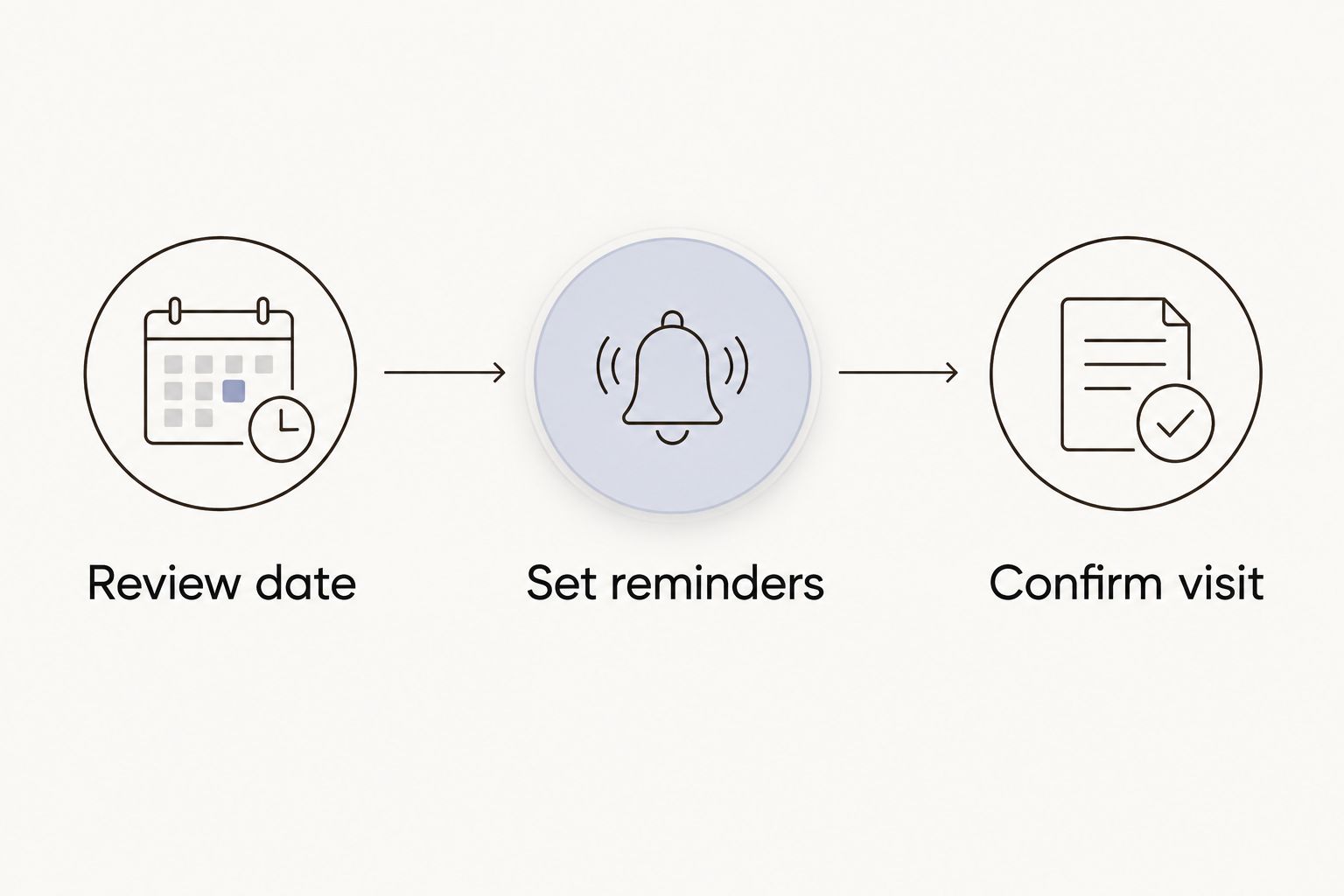
- In Description, add three action labels: Review date, Set reminders, and Confirm visit. Under them, record the seasonal check, the follow-up date, and the requirement for provider confirmation.
- Save the changes. When asked which recurring events to update, apply the change to the occurrences you intend to change rather than automatically altering the entire series.
- Create a temporary test event with a notification a few minutes ahead. Check whether your browser or device delivers it, then delete the test event.
Expected result: You receive the test notification and can see the real planning event's reminder settings. The event notes explain what action to take.
The workflow is simple: Review date, Set reminders, Confirm visit. Keep that order; a reminder supports a booking decision but cannot confirm the appointment itself.
Configuration unit: Your confirmed cleaning appointment
Once you receive a confirmed date and time, create a separate event. This protects your annual planning reminder from being overwritten by one visit's details.
- Request carpet cleaning through your chosen provider's normal contact process. Give the room scope, access details, preferred timing, and any product concerns; ask what preparation is required.
- Wait for explicit confirmation of the appointment. For Michaels Carpet Care carpet cleaning, discuss your carpet's condition and any sensitivities before agreeing on the work.
- Create a new Google Calendar event titled Confirmed carpet cleaning. Enter the date and time supplied by the provider, and leave it nonrecurring unless you have separately agreed to recurring service.
- Add the confirmed scope, access arrangements, preparation instructions, and drying guidance to Description. Record only what the provider actually told you.
- Add a preparation notification 1 day before the visit. Share this confirmed event with household members who need access or room-use information.
Expected result: Your calendar contains an annual planning reminder and a separate, provider-confirmed appointment. Each event has a different job.
For the 2026 visit, check the confirmation against the calendar entry before sharing it. A copied date, missing arrival window, or wrong property address is easier to correct before other people arrange their day around it.
Plan your carpet cleaning
Review carpet cleaning services for homes and businesses in McKinney, Frisco, Plano, and Allen.
Second workflow: Review timing when pollen conditions change
An annual reminder is a useful baseline, but it does not respond to changing pollen conditions. Add a manual review step if the timing of your household's seasonal concerns shifts.
Use annual planning for consistency; use a condition-led review when timing matters more than a fixed date. Neither workflow automatically books or changes a cleaning appointment.
| Workflow | Best for | Main benefit | Limitation |
|---|---|---|---|
| Annual planning reminder | Households wanting a repeatable maintenance prompt | Returns each year without rebuilding the event | Does not adjust itself to local pollen conditions |
| Condition-led review | Households checking a particular seasonal pollen concern | Lets you reconsider the preferred cleaning date | Requires you to review conditions and edit the plan |
To use the second workflow:
- Review current local pollen information when your annual planning reminder appears.
- Compare your preferred cleaning date with the household schedule and the seasonal concern you identified.
- Edit the planning event or create a separate follow-up if you need another decision point. A 2-week follow-up is a practical example, not a health recommendation.
- If an appointment is already confirmed, contact the provider before changing the appointment event. Update the calendar only after receiving the revised confirmation.
Expected result: Your planning reflects current information without treating a calendar edit as an agreed service change.
For 2026, keep the reason for any adjustment in the event notes. That gives next year's household decision useful context without pretending that seasonal conditions repeat on identical dates.
Troubleshooting
The reminder appears, but nobody is scheduled
The event is doing its planning job, not booking a service. Contact the provider, request the visit, and create the confirmed appointment only after you receive agreement on the date and time.
Keep “Review” in the planning title and “Confirmed” in the appointment title. The distinction should be visible without opening either event.
Google Calendar does not send the notification
Open the event and check that a notification is saved. Then check Google Calendar notification settings, browser notification permission, and the device settings for the delivery method you use.
Repeat the temporary test before trusting the next reminder. An event visible on the calendar is not proof that notifications are reaching you.
Editing one visit changes next year's reminder
You edited the recurring series rather than the separate appointment, or applied a change to more occurrences than intended. Reopen the affected events, restore the annual planning date, and correct the one-time appointment separately.
When Google Calendar asks which recurring events to change, read that choice before saving. Avoid deleting the annual series just because the current visit is complete.
Carpet is not ready for normal room use
Follow the cleaning provider's drying and re-entry instructions rather than using the calendar's end time as permission to replace furniture or resume traffic. Ask for those instructions before the visit and record them with the appointment.
Fast-drying service still requires planning around the actual carpet and conditions. Do not promise guests, staff, or household members a room-use time that the provider has not confirmed.
Customize your workflow
Once the basic reminder works, expand the notes rather than adding unnecessary automation. Useful additions include who provides access, which rooms need attention, where pets will stay, and who checks the confirmation.
For Michaels Carpet Care, homeowners and businesses can discuss carpet cleaning alongside the company's other stated services, including upholstery, tile, grout, and natural stone cleaning. Keep each surface's scope and preparation instructions separate. One carpet appointment does not establish that other surfaces are included.
If you want a broader recurring calendar routine, use the guide to connect Google Calendar to recurring carpet cleaning. Keep the same boundary between automatic reminders and provider-confirmed visits.
At the end of your 2026 appointment, update the annual reminder with what you want to remember: access arrangements, preparation questions, and whether the chosen date worked for your household. Do not carry old appointment times into the next year's plan.
FAQ
How do I automatically schedule carpet cleaning before allergy season?
Set an annual Google Calendar planning event with notifications, then request and confirm the cleaning separately. The workflow automates the reminder, not the provider's booking process.
How early should I set my carpet-cleaning reminder?
A reminder 4 weeks before your preferred cleaning date is a practical planning example. Choose an interval that gives you time to discuss the scope, arrange access, and obtain confirmation; it is not a required service lead time.
Does a Google Calendar invitation book a carpet cleaner?
No, a Google Calendar invitation does not by itself book a carpet cleaner. Obtain explicit confirmation from the provider before treating an event as an appointment.
What is the best date for carpet cleaning before allergy season in North Texas?
There is no single date that fits every North Texas household's seasonal pollen concerns. Choose your planning date using relevant local pollen information and your household schedule, rather than a universal spring deadline.
Will carpet cleaning prevent allergy symptoms?
Carpet cleaning does not guarantee prevention or relief of allergy symptoms. Treat it as household maintenance and ask a qualified clinician about diagnosis, triggers, and treatment.
Can I move my confirmed cleaning by editing Google Calendar?
No, editing your calendar does not change the provider's appointment. Request the change directly and update your event after the provider confirms the revised arrangements.
What should I ask Michaels Carpet Care before the visit?
Ask Michaels Carpet Care about the rooms and surfaces included, preparation, product sensitivities, furniture handling, and drying instructions. Record the agreed details in your confirmed appointment event.
One last thing
The recurring event should be a decision, not a promise. Name it for the action you control—reviewing the date and requesting service—rather than implying that a cleaner is already coming.
That small distinction keeps the workflow honest. Your calendar remembers the task; the provider confirms the visit.