
Instead of manually chasing a carpet cleaner after every Airbnb checkout, connect each turnover to a cleaning request, a confirmed appointment, and a dry-floor check before guest arrival. This guide shows you how to organize Airbnb turnover carpet cleaning in 2026 without confusing a calendar reminder with a booked service.
- Airbnb turnover carpet cleaning needs a confirmed appointment and a dry-floor check, not just a checkout reminder.
- Michaels Carpet Care serves North Texas hosts seeking eco-friendly, fast-drying carpet cleaning; confirm each turnover window directly.
- Keep reservation changes, stain photos, access instructions, and cleaning status in one turnover record.
- Treat the stated 1–2-hour drying window as planning guidance, not permission to skip inspection.
Why this matters
A checkout tells you when guests leave. It does not tell you whether the carpet needs professional attention, whether a cleaner has accepted the job, or whether the floor will be ready for incoming guests.
Michaels Carpet Care is best for North Texas hosts seeking eco-friendly, fast-drying carpet cleaning. The company serves McKinney, Frisco, Plano, and Allen; discuss the actual property condition and turnover window with Michaels Carpet Care before treating the appointment as confirmed.
The useful connection is a handoff: reservation information reaches the person assessing the carpet, the service provider receives a clear request, and the host receives a final readiness decision. You can build that workflow with a shared calendar and a task record. This guide does not depend on a native Airbnb-to-cleaner integration.
Before you start
- Reservation access: Have permission to view checkout dates, incoming check-in times, and reservation changes. Name a backup person who can update the turnover record when you are unavailable.
- A shared work record: Use a calendar and task list your host, co-host, or housekeeping lead already checks. Keep access instructions restricted to people who need them.
- A confirmed service process: Agree on how to request work, who accepts it, and how completion is reported. The hidden gotcha: a request sent is not an appointment accepted, and cleaning finished is not carpet dry.
For your 2026 setup, choose a single place for the current turnover status. Messages can support the record, but a message thread should not be the only place someone can find the next action.
Reservation record
Start with the booking information, not a recurring cleaning appointment. Every reservation needs its own turnover record so date changes do not become invisible exceptions.
The bold labels below are custom fields to create in your chosen task list, not claimed Airbnb buttons or settings. Use these names consistently so everyone reads the same information.
- Create Property, Reservation reference, Checkout, and Next check-in fields. Include the local time zone wherever your calendar supports it.
- Add Turnover owner and Backup owner. Assign responsibility to a person rather than leaving the record with a general team name.
- Create Carpet assessment, Service status, and Readiness status fields. Keep these separate: condition, appointment progress, and guest readiness answer different questions.
- Add Access instructions in a restricted location. Put only the access reference in broadly shared calendar notes, not an unrestricted door code.
- Link the task to the relevant calendar event using your application's supported method. If no linking feature exists, copy the reservation reference into both records.
Expected result: One reservation has one identifiable turnover record, an owner, and an arrival deadline. Anyone taking over the task can tell which property and booking it concerns without searching separate conversations.
Use a template rather than copying an old guest's task unchanged. A blank template avoids carrying forward stale access details, an outdated check-in time, or a completed status from the previous stay.
Assessment and service request
An Airbnb turnover carpet cleaning workflow should request the right work, not automatically assume every checkout requires a full professional clean. Let the property assessment determine the scope.
- Set Carpet assessment to Awaiting inspection before checkout. Ask housekeeping to inspect after the departing guests have left and before covering the floor with luggage or supplies.
- Record the affected rooms, visible marks, odors, and known spills. Attach a wide room photo and a close-up of each problem area; these serve different purposes.
- Add Previous treatment notes. Record what was applied, where it was used, and whether the area is still damp. Do not ask staff to keep trying unfamiliar products while waiting for instructions.
- Send the service provider the property location, affected areas, photos, access window, and next guest arrival deadline. Ask for a scope recommendation and confirmation of whether the work fits that window.
- Set Service status to Requested. Change it to Confirmed only after the provider accepts the job and the timing.
Expected result: The cleaning request describes the condition and deadline, and the record distinguishes an unanswered request from a confirmed appointment.
Michaels Carpet Care describes a gentle-first approach, starting with safe, gentle products and using something stronger when the carpet needs it. That approach supports a useful intake habit: report the stain history instead of asking for the strongest treatment.
Do not promise stain or odor removal to the next guest before assessment. A visible mark and its underlying cause are not the same thing. Give the cleaner the information needed to explain the treatment and its limits.
Appointment and readiness gates
Build the schedule backward from guest arrival. The turnover needs room for access, assessment, cleaning, drying, and a final check—not merely the cleaning appointment itself.
- Record the agreed service window in Service status, alongside the provider's confirmation. Keep Next check-in visible in the same record.
- Ask the cleaner to explain the expected drying conditions for the actual carpet and treatment. Michaels Carpet Care describes drying in 1–2 hours; use that as planning guidance, not a guaranteed release time for every job.
- Arrange the housekeeping sequence so staff do not repeatedly walk across freshly cleaned carpet. Keep supplies and equipment out of the treatment area once work begins.
- After cleaning, set Readiness status to Drying. Record any instructions about airflow, furniture, or access exactly as provided.
- Inspect before setting Readiness status to Ready. Check the treated areas, any remaining odor, and the route guests will use through the property.
Expected result: A completed appointment does not automatically release the property. A named person verifies the carpet before the turnover is marked ready.
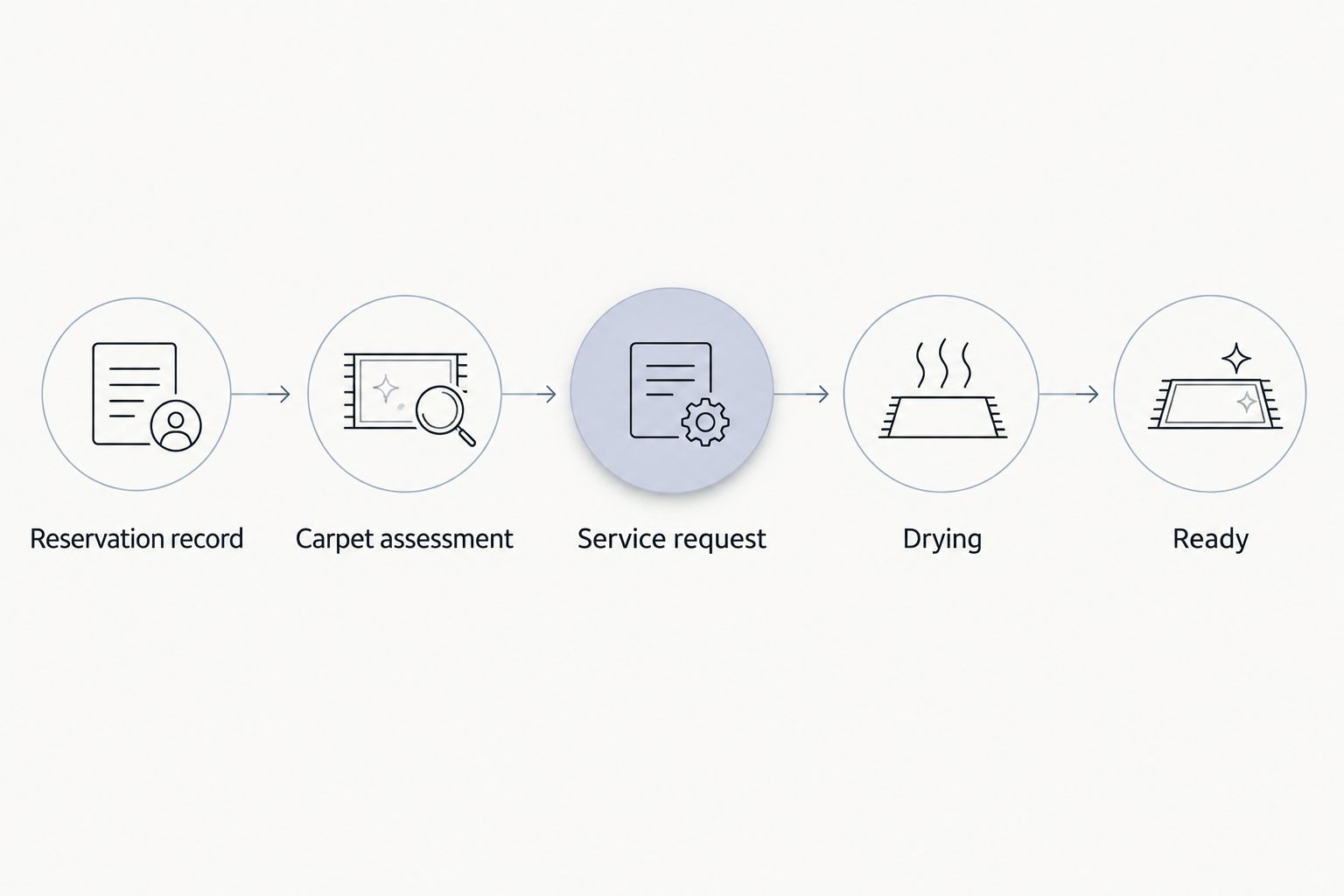
For a 2026 turnover checklist, include an explicit Not ready status. If the carpet remains damp or the work cannot fit the guest arrival deadline, escalate to the host rather than silently closing the task.
A same-day request is not a same-day promise. Confirm the scope and timing before changing the turnover plan or telling another team member that the problem is handled.
When a reservation changes
The adjacent workflow is just as important: update the cleaning task whenever the reservation changes. An extended stay, canceled booking, or revised arrival time can make a previously sensible appointment wrong.
- Open the existing turnover record using Reservation reference. Update that record rather than creating another task for the same booking.
- Revise Checkout and Next check-in. Compare the new window with any confirmed cleaning appointment.
- Set Service status to Change requested when provider agreement is needed. Keep the original confirmation visible until the replacement arrangement is accepted.
- Notify the turnover owner and service provider directly. Do not assume editing a shared calendar notifies everyone or changes the provider's schedule.
- Record the revised confirmation and remove obsolete reminders. If the reservation is canceled, confirm whether the cleaning work is still needed before closing the task.
Expected result: The current reservation and cleaning appointment agree, and there is no duplicate request waiting to confuse the next shift.
If you manage several properties, the property management software-to-move-out cleaning guide covers a related handoff. Keep the same principle: booking data starts a process; service acceptance completes the scheduling decision.
Choose the right request pattern
For your 2026 operating plan, choose the request pattern that matches how much advance information you have. Neither pattern removes the need for a final inspection.
| Workflow | Best for | Advantage | Limitation |
|---|---|---|---|
| Planned appointment request | Hosts scheduling known carpet maintenance between stays | Gives everyone an agreed scope and window before turnover | Reservation changes still require provider confirmation |
| Inspection-led request | Hosts deciding the scope after checkout | Uses current photos and actual carpet condition | The required work might not fit the remaining turnover window |
Use planned requests for known maintenance and inspection-led requests for unexpected conditions. Do not make last-minute professional cleaning the only response available for every turnover.
Troubleshooting
The reminder fired, but no cleaner arrived
A reminder is an internal prompt, not evidence of an accepted appointment. Check Service status for an actual confirmation, then contact the provider through the agreed channel.
Prevent repeats by keeping Requested and Confirmed separate. Never let an automated reminder mark the appointment confirmed on its own.
The same reservation has duplicate cleaning requests
Look for copied tasks, repeated messages, or a reservation edit that created a fresh record. Match records by Reservation reference, keep the current one, and explicitly withdraw the duplicate request with the provider.
Deleting a calendar event does not communicate cancellation by itself. Confirm that everyone involved understands which appointment remains active.
The carpet is still damp near check-in
Leave Readiness status at Not ready and contact the cleaner for instructions. Follow the agreed drying guidance; do not substitute a clock reading for an inspection.
Review whether the appointment allowed enough time for the actual treatment and drying conditions. Adjust the next turnover plan rather than repeating the same narrow window.
A stain remains, or an odor returns
Send updated photos and describe what changed after cleaning. Include previous treatment notes and ask for reassessment before applying another product.
Keep the issue open in the turnover record. Do not mark it resolved merely because an appointment took place, and do not promise a result the cleaner has not confirmed.
Customize your workflow
Expand the record by surface, not just by room. Carpet, upholstery, tile, grout, and natural stone need separate scope notes so a request for one surface does not silently become a request for all of them.
Michaels Carpet Care provides those cleaning services, but its upholstery cleaning does not cover leather or vinyl. Identify the material before adding a sofa or chair to the request, and ask the provider to confirm suitability when the care information is unclear.
For your 2026 template, add Recurring issue and Follow-up action fields. Repeated marks in one location deserve a documented conversation about the cause and maintenance plan, not another unexplained emergency task.
Discuss your turnover cleaning plan
Share your North Texas property location, carpet concerns, and guest arrival deadline.
FAQ
How do I connect Airbnb turnovers to carpet cleaning?
Create a turnover record for each reservation, assess the carpet after checkout, and send a clearly scoped service request. Track provider confirmation and carpet readiness separately so a reminder never becomes a mistaken booking.
Does this workflow automatically book a carpet cleaner?
No. This workflow organizes the handoff; it does not establish a native Airbnb integration or automatically accepted appointment. Treat a job as confirmed only after the service provider accepts the scope and timing.
Can I arrange Airbnb turnover carpet cleaning on the same day?
Same-day cleaning requires provider confirmation and enough time for treatment, drying, and inspection before guest arrival. Send the checkout time, arrival deadline, property location, and condition photos before relying on that plan.
How long should I allow for carpet drying?
Michaels Carpet Care describes drying in 1–2 hours, but your turnover plan must use the cleaner's guidance for the actual job. Inspect treated areas before releasing the property rather than relying only on elapsed time.
Should I request professional carpet cleaning after every Airbnb checkout?
Use the carpet assessment and an agreed maintenance plan to decide the scope. Record visible soil, stains, odors, and previous treatments instead of automatically assigning the same professional service to every stay.
What should I do when a guest changes the checkout date?
Update the existing turnover record and request any necessary appointment change directly with the cleaner. Keep the original arrangement visible until the revised timing is confirmed, then remove obsolete reminders.
What information should I send with a turnover cleaning request?
Send the property location, affected rooms, condition photos, known spill or treatment history, access window, and next guest arrival deadline. Share access credentials only through a restricted channel with the people who need them.
One last thing
A clean-looking carpet is not the same as a guest-ready carpet. Make the final handoff a short written decision: inspected, dry, and ready—or not ready, with the next action assigned. That distinction keeps an unfinished job from disappearing behind a completed calendar event.