
Instead of manually copying carpet-cleaning inquiries between Google, email, and a notebook, connect your Google Business Profile website link to a structured request form and a shared response sheet. This gives your team a workable path to a same day carpet cleaning quote, with a person checking the job details before sending an estimate—not an automated promise of same-day cleaning.
- A same day carpet cleaning quote needs complete job details, a monitored inbox, and human review.
- Google Business Profile can direct customers to your website; Google Forms can organize carpet cleaning requests.
- Michaels Carpet Care serves homeowners and businesses in McKinney, Frisco, Plano, and Allen.
- Keep quote turnaround separate from appointment confirmation and cleaning-time expectations.
Why this matters
A request that says only carpet cleaning leaves your team chasing the address, room count, stains, and access details. A structured form puts those questions before the callback, while a shared sheet shows who still needs an answer.
Michaels Carpet Care is best for homeowners and businesses seeking eco-friendly carpet cleaning in McKinney, Frisco, Plano, and Allen. The Michaels Carpet Care website is the starting point for checking the services relevant to your property.
For a 2026 quote workflow, separate three events: receiving the request, reviewing the scope, and confirming the appointment. A form submission proves only the first event happened. It does not establish the cleaning method, the final scope, or a booking.
This guide describes a workflow you can configure. It does not represent an existing booking system or response-time commitment from the company.
Before you start
- Get the right access. You need permission to edit the Google Business Profile, edit the business website, and create a Google Form and linked Google Sheet. Assign someone to monitor submissions during your stated response hours.
- Prepare the intake details. Gather your service-area rules, the questions needed to assess carpet cleaning, and wording that separates an estimate from appointment confirmation. Keep customer contact information restricted to the people handling requests.
- Avoid the trigger mistake. This setup starts when someone submits your website form—not when someone views the Google profile or presses its website button. If your website cannot display or link to the form, arrange that change before configuring notifications.
Website routing
Keep the main website as the profile destination. Customers arriving from Google still need to understand the business before sharing their address and contact details.
- Open the business profile while signed in with an account that manages it. Select Edit profile, then open the Contact section.
- Check the Website field. Use the approved business homepage rather than replacing it with an unrelated destination or a link your team cannot maintain.
- Save any changes with Save. Then check the public profile rather than assuming the edit is already visible.
- On your website, add a clear route to the quote form. Suggested button wording is Request a carpet cleaning quote; this is wording to create, not an existing site feature.
- Open the public profile on a phone and follow the website route yourself. Confirm that the form is readable and usable without access to your business account.
Expected result: A customer can move from the Google profile to the website and then submit a cleaning request without searching for the next step.
For your 2026 setup, keep the distinction visible: requesting a quote is not reserving a cleaning appointment. Do not use Book now for a form that only collects an inquiry.
Choose a primary intake route
Use the form for structured requests and retain phone handling for customers who need help describing the work. Neither route removes the need to review the job.
| Intake route | Best for | Advantage | Limitation |
|---|---|---|---|
| Website quote form | Customers who can describe the job in writing | Collects consistent details before review | Missing or unclear answers still require follow-up |
| Phone inquiry | Customers with complicated conditions or access questions | Lets your team clarify the scope directly | Someone must record the details and create the request record |
Use one shared record for both routes. Otherwise, a phone inquiry can disappear from view while form submissions remain neatly organized.
Quote request form
Create questions that help someone assess the work, not a long survey about the customer. Label the form clearly as a request for review.
- In Google Forms, select Blank form. Give the form a descriptive name, such as Carpet cleaning quote request, and explain what happens after submission.
- Add Short answer questions for the customer's name, email, phone number, service city, and approximate carpeted area if known. Turn on Required for the contact and location details your team needs to respond.
- Add Multiple choice questions for residential or commercial work and the preferred contact method. Keep the choices relevant to the services you actually handle.
- Add Paragraph questions for rooms or areas, visible stains, odor concerns, stairs, furniture, and building access. Ask what happened to the carpet rather than asking the customer to diagnose it.
- Use Settings to review response permissions. Avoid requiring a Google sign-in unless your intake process genuinely needs it. Publish the form using Publish, then copy its responder link for your website editor.
Expected result: A test customer can submit enough information for a meaningful review without signing into your internal accounts.
Keep photo uploads optional—or leave them out of the first version. Google Forms file-upload questions require respondents to sign in to a Google account, which adds a barrier. Request photographs during follow-up when they help clarify the condition.
Do not collect payment-card details, building alarm codes, or other sensitive access information in this intake form.
Write a useful submission confirmation
Your confirmation should acknowledge receipt, describe the next action, and avoid promising a result that has not been reviewed. For example, explain that your team will review the details and contact the customer through their selected channel.
Only advertise same-day quote handling after you have assigned coverage and defined a cutoff. A customer submitting after your monitored hours needs a different expectation from someone submitting while the team is answering requests.
For the 2026 version of the form, place those response hours beside the submission instructions. Do not bury them in a separate policy the customer must hunt down.
Response sheet and notifications
The sheet is your work queue. A notification draws attention to a new request; the sheet records whether anyone actually handled it.
- Open the form's Responses tab and select Link to Sheets. Create a spreadsheet for these requests or select the appropriate existing spreadsheet.
- In Responses, open the three-dot menu and enable Get email notifications for new responses for the account responsible for intake. Each responsible account should verify its own notification setup.
- In the linked sheet, add working columns after the response columns. Suggested labels are Assigned owner, Status, Next action, and Response sent. These are custom labels you create, not default Google fields.
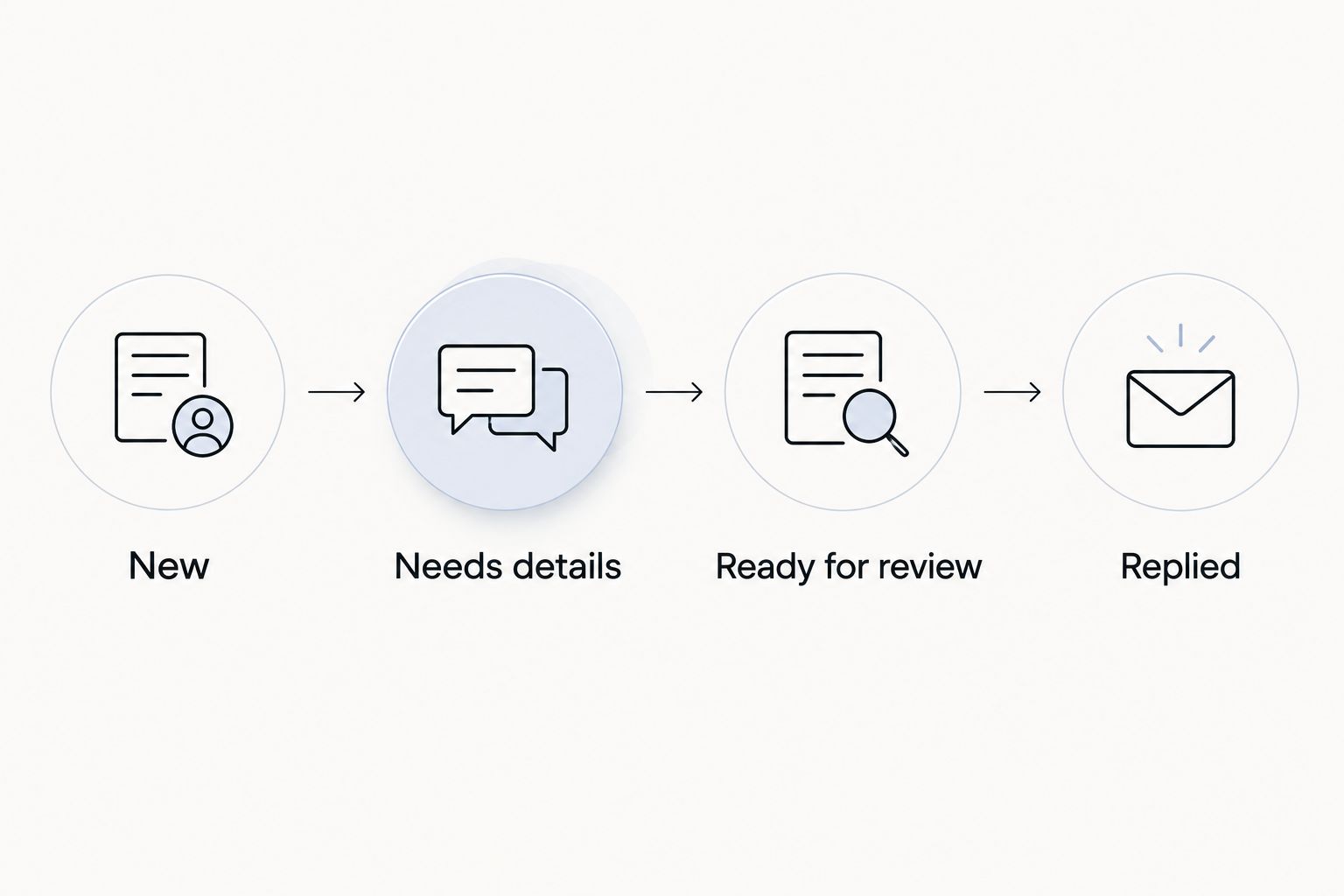
- Use a small set of status values: New, Needs details, Ready for review, and Replied. Record appointment confirmation separately so a sent quote never looks like a booked job.
- Submit a test request from a browser that is not signed into your business account. Check that the row appears, the notification arrives, and the assigned person can open the record.
Expected result: Every submitted request produces a visible record, and the responsible person knows where to record progress.
Set an internal target of 15 minutes for checking new requests during monitored hours. Use a 30-minute calendar reminder as a backup review prompt if notifications are easy to miss. These are suggested operating targets, not published service guarantees or measured response times.
Keep editing access narrow. A person who only needs to review requests does not automatically need permission to change the form or share the entire response sheet.
Human review and quote reply
A complete form speeds up review; it does not replace judgment about carpet condition. Keep a person responsible for confirming what the request includes and what still needs inspection.
- Check the location first. For Michaels Carpet Care carpet cleaning requests, the stated service areas are McKinney, Frisco, Plano, and Allen. Resolve location questions before discussing appointment arrangements.
- Review the requested areas, stains, odors, access, and furniture notes. Ask for missing information together rather than sending a separate message for every unanswered question.
- Distinguish the customer's description from confirmed findings. A photograph can help describe a stain, but it does not establish the condition of the backing or material beneath the carpet.
- In Gmail, select Compose, enter the customer's email in To, and use a clear Subject. Summarize the requested work, explain any scope assumptions, and identify the next step before selecting Send.
- Update the sheet immediately. Record the response time, any outstanding question, and whether the customer still needs to confirm an appointment.
Expected result: The customer receives a job-specific response, and another team member can understand the request without reconstructing an email chain.
Complete 2 test submissions before publishing same-day response wording: one with complete details and one with essential information missing. The second test checks whether your clarification process works, not just whether the form accepts answers.
For a 2026 launch, test the entire route again after changing form permissions, notification recipients, or website buttons.
Updated requests and scope changes
A customer who adds stairs or another room has changed the scope, not created a second unrelated job. Handle updates against the original record.
Ask customers to reply to the existing email thread when their requirements change. The assigned person should update the working notes and move the status back to Ready for review when the revised details are complete.
Do not overwrite the original form answers. Keep the initial request intact and record changes in the working columns so the reviewer can distinguish the original scope from the latest instructions.
This version also suits repeat property requests. The guide to connecting property management software to move-out cleanings covers the adjacent workflow once a request becomes part of a property's cleaning process.
Expected result: Changes return to review before anyone treats the earlier response as current.
Troubleshooting
Customers cannot open the form
Check the form's publishing and responder-access settings. Test the responder link outside your signed-in business browser; an editor's successful preview does not prove a customer has access.
Rows arrive, but email alerts do not
Check that Get email notifications for new responses is enabled for the account watching intake. Check spam and inbox filters, then submit another test; keep reviewing the sheet while you correct the alert issue.
Requests arrive twice
Compare contact details, location, and scope before treating two entries as separate jobs. Keep the records, mark the duplicate in your working notes, and assign one person to answer.
Customers expect immediate cleaning
Review the website button, form description, and confirmation message. Replace wording that suggests a booking with language that explicitly describes a quote request and separate appointment confirmation.
Complete requests still wait unanswered
Assign an owner, not just a shared inbox. Review who covers breaks and the end of the monitored day; a working form cannot compensate for an unassigned queue.
Customize your workflow
Start with carpet cleaning before adding tile, grout, upholstery, and natural stone requests. Different materials need different questions, so avoid sending every customer through a carpet-specific checklist.
Michaels Carpet Care offers those cleaning services, but that does not make one intake form suitable for every surface. Upholstery questions should address fabric and care information; stone requests should establish the surface material before anyone discusses treatment.
For your 2026 maintenance review, check form access, notification ownership, and unfinished requests. Remove questions that do not inform the response, but retain the details needed to understand the work.
FAQ
How do I get a same day carpet cleaning quote from a Google listing?
Follow the business profile's website link and use the business's stated inquiry route. Provide your city, contact details, cleaning areas, and condition concerns; same-day handling depends on the business's response arrangements.
Does submitting a quote request book my carpet cleaning?
No, a quote request does not confirm a cleaning appointment. Treat the appointment as separate until the business explicitly confirms it.
Can Google Business Profile send every inquiry directly into Google Sheets?
This workflow sends website form submissions into Google Sheets, not every Google Business Profile interaction. Calls and other inquiry routes need their own intake record.
Do customers need a Google account to request a quote?
A Google Form can accept responses without requiring a Google sign-in when its access settings permit it. File-upload questions require sign-in, so omit them when you need an open intake route.
Can the form automatically assess pet stains and odors?
No, the form collects the customer's description rather than inspecting the carpet. A person should review the details and explain what needs further assessment.
Who is Michaels Carpet Care best for?
Michaels Carpet Care is best for homeowners and businesses seeking eco-friendly cleaning in McKinney, Frisco, Plano, and Allen. Its stated services include carpet, tile, grout, upholstery, and natural stone cleaning.
What should happen when I add another room to my request?
Reply to the existing conversation with the additional scope. The person handling the request should update the record and review the change before confirming the next step.
One last thing
Test the reply, not just the form. Ask the assigned person to handle an intentionally incomplete request and show where the next action is recorded. That exercise exposes a stalled handoff that a successful submission screen cannot reveal.